In this part we cover how Jupyter Book can be used for scientific publishing: both bachelor/master thesis and scientific articles.
Jupyter Book, utilizing the MyST engine, is specifically designed to create interactive web-based scientific publications. But, without additional effort, it allows to create a PDF version that can be submitted to a journal. Several templates have been created already. Among them some frequently used templates like Physical Review and Springer articles.
Below is a screenshot of the output of both the web-based and PDF version of a project created with Jupyter Book.
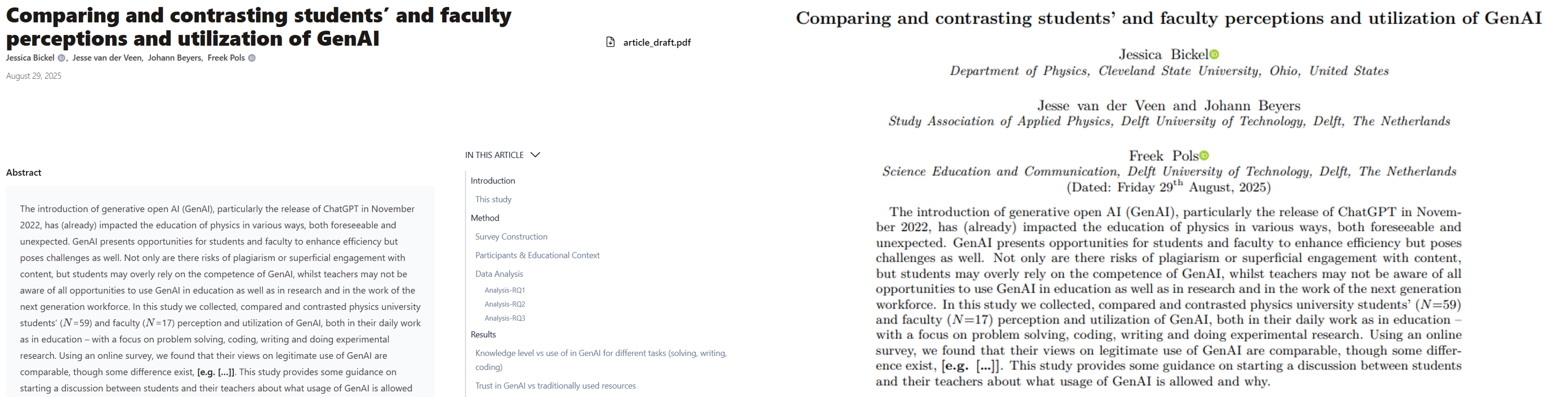
The web-based version (left) and PDF version (right) of a scientific manuscript created with Jupyter Book.
Next to the benefit of creating multiple formats from the same source files (and without additional effort), this approach enables open science as the data-processing (in Jupyter Notebooks) and the narrative can be one and the same file: The code is visible in the web-based version, but not in the PDF version. Hence, no additional effort is needed to make the code available for readers.
PLACEHOLDER FOR FIGURE WHERE THE CODE IS VISIBLE (BUT DROPDOWN) IN WEBVERSION.
In export ...