

Abstract
In this demo, we demonstrate how Jupyter Book can be used to create and publish a content rich paper that includes interactive elements such as code cells, visualizations, and multimedia. We will walk through the process of setting up a Jupyter Book, adding content, and deploying the final product online.
Jupyter Book has been rebuild from ground up using the MyST engine Jupyter et al., 2025. This allows to export content in multiple output formats including HTML, PDF and docx. In this paper we present an overview of the possibilities and demonstrate its working.
In an introduction. you often cite. Than can be done in various ways, either using a .bib file or directly using the doi.
cite with doi
[@doi:10.25080/hwcj9957]resulting in Jupyter et al., 2025@doi:10.25080/hwcj9957resulting in Jupyter et al. (2025)
cite from bib-file
{cite:t}jupyter2025`` resulting in Jupyter et al. (2025){cite:p}jupyter2025`` resulting in Jupyter et al., 2025
Background
Jupyter Book has been rebuild with the intend to export content in multiple output formats including HTML, PDF and docx. Figure 1 provides this idea.
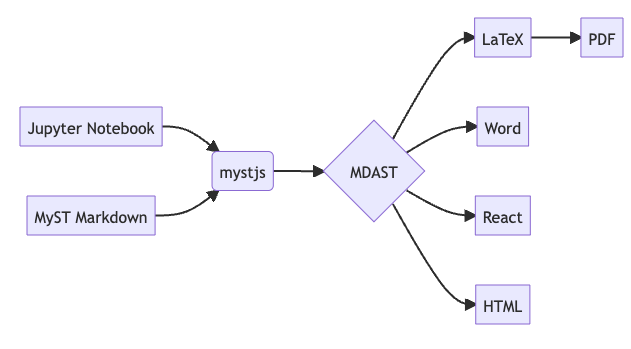
Figure 1:The myst engine allows Jupyter Notebook, markdown and even tex files to be converted to multiple output formats.
As exporting to different formats is possible, it is not always desired. Some content should only be visible in the HTML version, and some content only need to be included in the PDF version. You can use blocks like +++{"no-pdf":true} to enable this, as shown below where the figure is seen in the HTML version but not in the PDF version.

Figure 2:A figure that is in the website but not in the PDF version.
Moreover, sometimes you want to have content only showing up in the pdf, if you use Typst you can use of a block +++{raw:typst} and for LaTeX +++{raw:latex}.
- Jupyter, P., Bolyen, E., Caporaso, J. G., Cockett, R., Garside, D., Holdgraf, C., Hollands, A., Kent, J., Koch, F., Madge, J., McKay, M., Morrison, M., Pérez, F., Purves, S., Kelley, M. R., Rose, B. E. J., Sharan, M., Sipőcz, B. M., Walt, S. J., & Whitaker, K. J. (2025). Jupyter Book 2 and the MyST Document Stack. Python in Science Conference, 2025. 10.25080/hwcj9957